
How To Disable Crossplay in Black Ops 6 on Xbox and PS5
Crossplay in Call of Duty: Black Ops 6: A Balanced Look and How to Disable It
Cross-platform play has revolutionized online gaming, uniting the Call of Duty community. However, crossplay isn't without its drawbacks. This guide explains how to disable crossplay in Black Ops 6 and the trade-offs involved.
The Crossplay Dilemma
Disabling crossplay in Black Ops 6 presents a trade-off. Many players disable it to level the playing field, particularly console players seeking to avoid PC players. PC players often possess a significant advantage due to the superior precision of mouse and keyboard controls over controllers. Furthermore, the prevalence of cheats and hacks, even with anti-cheat measures like Ricochet, motivates some to disable crossplay in hopes of reducing encounters with cheaters.
The Downside of Disabling Crossplay
The primary drawback is a significantly reduced player pool, leading to longer matchmaking times and potentially poorer connection quality in matches. Finding games can become considerably more challenging.
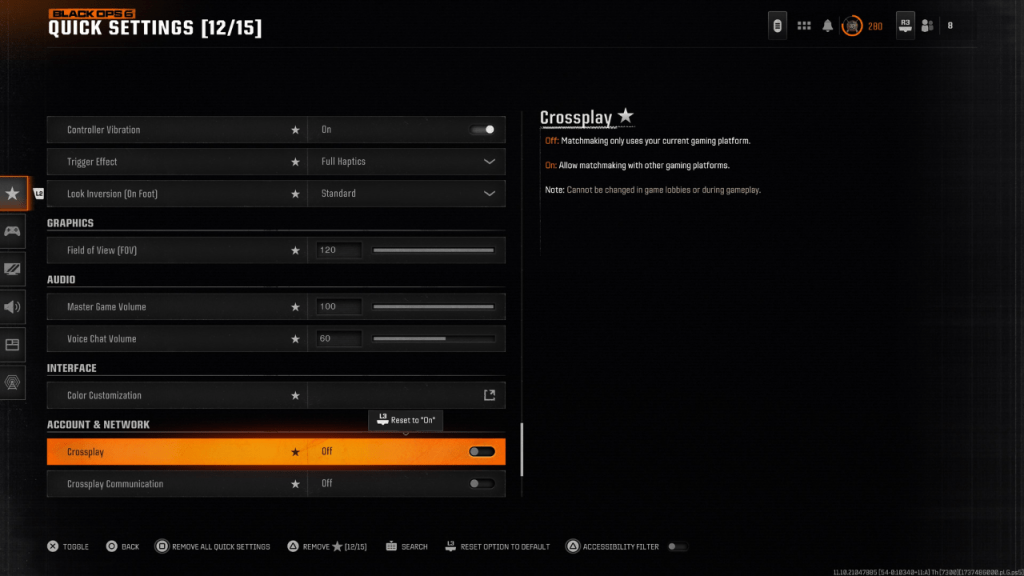
Disabling Crossplay: A Step-by-Step Guide
Disabling crossplay is simple. Access the Account & Network settings. Locate the Crossplay and Crossplay Communications toggles (often near the top). Toggle the setting from "On" to "Off" using the X or A button. This can be done from within Black Ops 6, Warzone, or the main Call of Duty menu. Note that the image shows the setting added to Quick Settings for easier access.
Important Considerations
Keep in mind that crossplay may be mandatory in certain game modes, such as Ranked Play, to ensure fair matches. However, Black Ops 6 Season 2 allows for crossplay disabling even in these modes, giving players more control over their gameplay experience.
Call of Duty: Black Ops 6 is available on PlayStation, Xbox, and PC.
-
 After years of speculation about The Sims 5, EA is charting a bold new course for the franchise. Instead of traditional numbered sequels, the company plans to expand "The Sims Universe" with ongoing updates across multiple titles.EA Plans on ExpandinAuthor : Samuel Mar 16,2026
 -
A new offline mode for Ubisoft’s The Crew 2 is available now, allowing owners to play the racing MMO without an internet connection if desired. The functionality—dubbed Hybrid Mode—has been fully detailed on the publisher’s website. According to UbisAuthor : Michael Mar 15,2026





















- Classic WoW vs. Turtle WoW: 6 Key Differences
- Ultimate Guide to Shinigami Progression in Hollow Era
- Roblox Simulator Codes: Unlock Exclusive Rewards!
- Mastering Two-Handed Weapons in Elden Ring: A Guide
- Wuthering Waves: Uncover the Secrets of Whisperwind Haven's Palette
- Top 25 Palworld Mods to Enhance Your Game