
Best Hitting Settings for MLB The Show 25
Spring has sprung, and with it comes the return of baseball and the latest installment from San Diego Studio: MLB The Show 25. While brimming with potential, mastering MLB The Show 25's hitting mechanics requires finesse. Here's a guide to the optimal hitting settings to help you crush those home runs.
Recommended Videos Best Settings for Hitting in MLB The Show 25
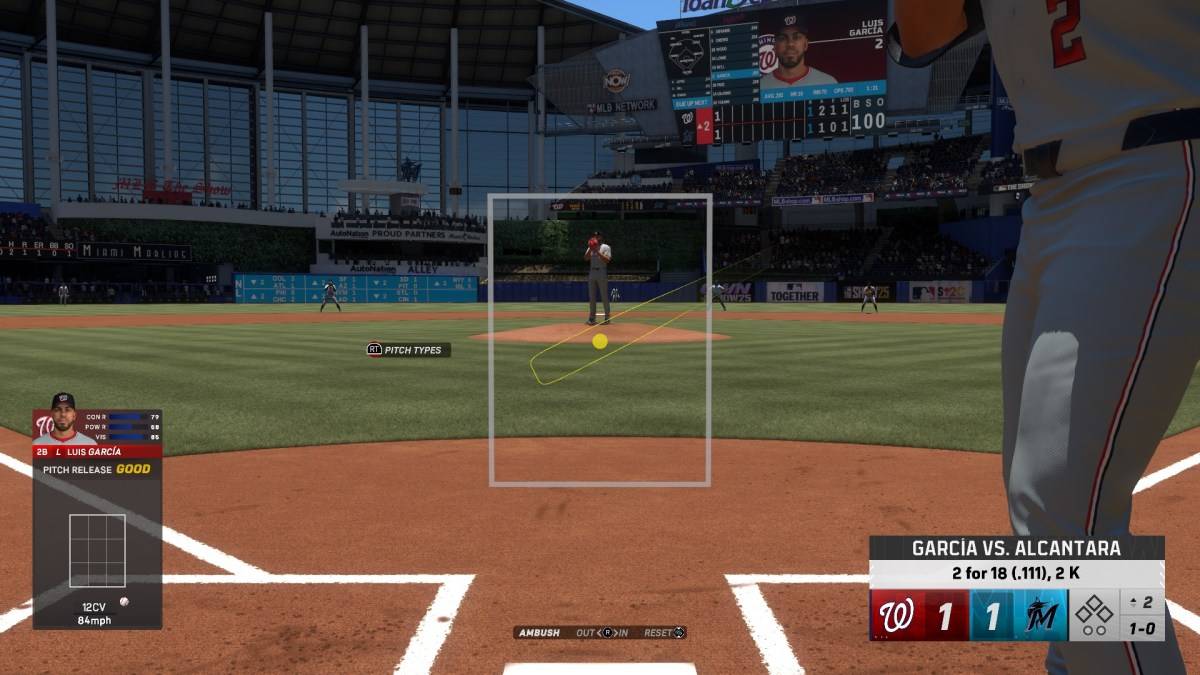
After completing MLB The Show 25's intro, dive into the settings menu. The sheer number of customizable options can be overwhelming, but this guide provides a solid starting point.
Hitting Interface
| **Best Hitting Interface in MLB The Show 25** |
| Zone |
Consistent with previous MLB The Show titles, the Zone hitting interface reigns supreme in MLB The Show 25. Its flexibility allows for precise PCI (Player Contact Indicator) placement within the batter's box, granting maximum control. While initially daunting, mastering this control allows for perfectly timed swings, especially crucial when facing those tricky curveballs.
PCI Settings
| **Best PCI Settings in MLB The Show 25** |
| PCI Center – Bat |
| PCI Inner – None |
| PCI Outer – None |
| PCI Color – Yellow |
| PCI Opacity – 80% |
| PCI Fadeout – None |
Finding the perfect PCI settings is highly personal. However, the above configuration simplifies the process by visualizing the PCI as a bat, helping you anticipate ball placement. Focusing on the sweet spot takes practice, but with enough time, hitting becomes second nature.
Adjust the Color and Opacity settings based on game time. Yellow works well for day games, but switching to Blue or Green might improve night game performance.
Experiment with the new PCI Anchor settings, which allow adjustments based on the batter and pitcher. While not drastically impactful in our testing, your mileage may vary.
Related: How To Get the Shane Gillis & Sketch Cards in EA Sports College Football 25
Camera Settings
| **Best Hitting View in MLB The Show 25** |
| Strike Zone 2 |
While PCI mastery is paramount, the hitting view is equally crucial. Distant camera angles can be distracting, hindering focus on the pitcher. Strike Zone 2 offers the ideal balance, immersing you in the action without sacrificing clarity.
These settings provide a strong foundation for success in MLB The Show 25.
MLB The Show 25 is now in Early Access on PlayStation 5 and Xbox Series X|S.
Next Poll
-
 ATHENA: Blood Twins masterfully blends high-speed combat with a rich narrative, featuring fluid hack-and-slash mechanics, customizable skill trees, and an intricate weapon mastery system. Adventurers will journey through haunting gothic landscapes—raAuthor : Ava Mar 13,2026
 -
 RuneScape's April Developer Diary has arrived, detailing the latest update: "Return to the Desert: Pharaoh's Folly." This brand-new quest launches today and will be available until April 28th. Your mission is to survive the treacherous Shifting TombsAuthor : Andrew Mar 12,2026
-
 4 Pics Association Word PuzzleDownload
 -
 Win68Download
 -
 Kitty LetterDownload
 -
 SwingShotDownload
 -
 The Seven Realms 3Download
 -
 Curse of the Night Stalker - Chapter 3 releaseDownload
 -
 My Home Design: My House GamesDownload
 -
 100+ RiddlesDownload
 -
 Elite PokerDownload
 -
 Sinful Summer: A Tale of ForbiddenDownload










- HoYo Fest 2025: Fresh Updates on Comeback
- Mastering Two-Handed Weapons in Elden Ring: A Guide
- Ultimate Guide to Shinigami Progression in Hollow Era
- Roblox Simulator Codes: Unlock Exclusive Rewards!
- Wuthering Waves: Uncover the Secrets of Whisperwind Haven's Palette
- Top 25 Palworld Mods to Enhance Your Game