
Best Settings to Reduce Motion Sickness in Avowed
Conquer Motion Sickness in Avowed: Optimal Settings for a Smooth Gameplay Experience
Many players experience motion sickness while playing first-person games. If Avowed is causing you discomfort, these settings can help alleviate the problem.
Recommended Settings for Minimizing Motion Sickness in Avowed
The primary culprits of motion sickness in first-person games are often head movement, field of view, and motion blur. Let's address these in Avowed:
Eliminating Head Movement and Camera Shake
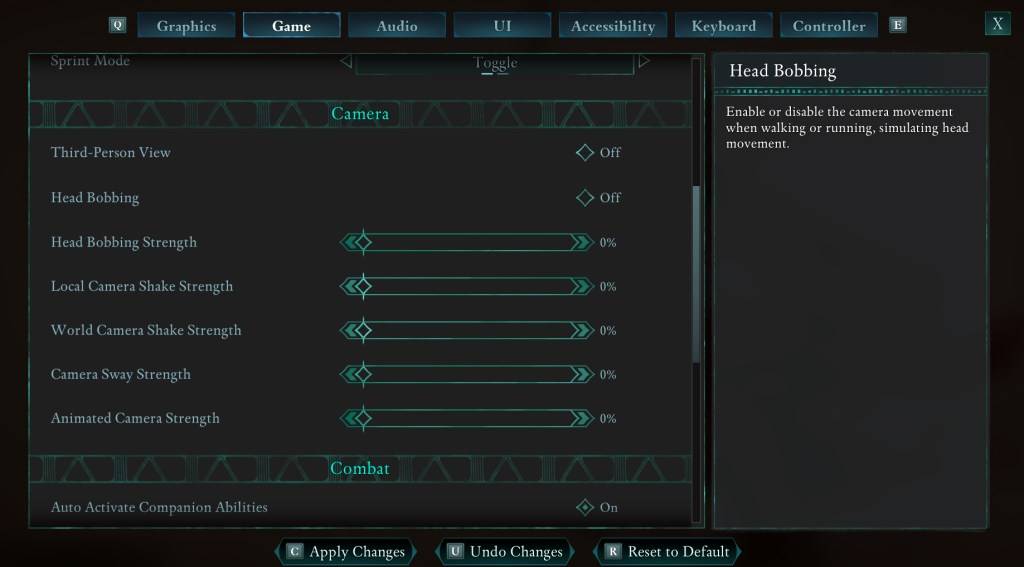
To significantly reduce motion sickness, start by adjusting the camera settings. Navigate to Settings > Game > Camera and modify the following:
- Third-Person View: Your preference (on or off).
- Head Bobbing: Off
- Head Bobbing Strength: 0%
- Local Camera Shake Strength: 0%
- World Camera Shake Strength: 0%
- Camera Sway Strength: 0%
- Animated Camera Strength: 0%
Experiment with these settings to find the optimal balance between immersion and comfort.
Adjusting Field of View and Motion Blur
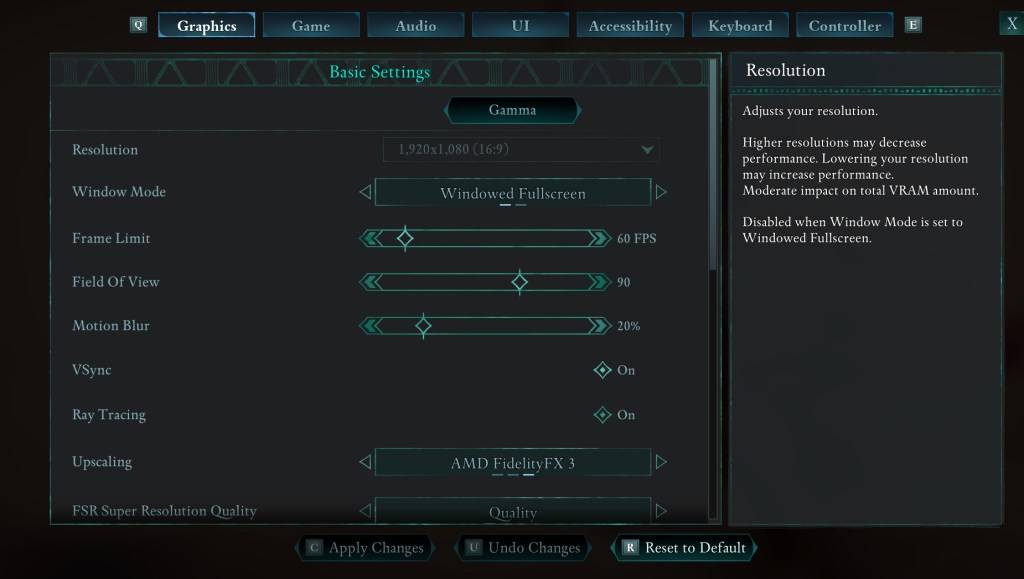
If eliminating head movement isn't sufficient, adjust the graphics settings. Go to Settings > Graphics and locate the "Field of View" and "Motion Blur" sliders:
- Field of View: Start with a lower value and gradually increase it until you find a comfortable setting. This might require some experimentation.
- Motion Blur: Reducing or completely disabling motion blur often helps alleviate motion sickness.
Persistent Motion Sickness?
If you still experience motion sickness, continue tweaking the above settings and consider switching between first-person and third-person perspectives as needed. However, if the discomfort persists, prioritize your well-being. Take breaks, hydrate, and try playing again later.
These adjustments should significantly improve your Avowed experience. Remember, prioritizing comfort is key to enjoying the game.
Avowed is available now.
-
Lego Batman: Legacy of the Dark Knight Lego Batman: Legacy of the Dark Knight has been unveiled during Gamescom’s Opening Night Live, showcasing an expansive open-world Gotham City you can explore in the iconic Batmobile. The highly anticipated projeAuthor : Ava Mar 25,2026
-
 East Side Games Group is merging two wildly different universes in an exhilarating crossover. Trailer Park Boys: Greasy Money is joining forces with All Elite Wrestling: Rise to The Top. This special event begins on March 27th at 2:00 PM PT, deliveriAuthor : Sarah Mar 17,2026

















- Classic WoW vs. Turtle WoW: 6 Key Differences
- Ultimate Guide to Shinigami Progression in Hollow Era
- Mastering Two-Handed Weapons in Elden Ring: A Guide
- Roblox Simulator Codes: Unlock Exclusive Rewards!
- Wuthering Waves: Uncover the Secrets of Whisperwind Haven's Palette
- Top 25 Palworld Mods to Enhance Your Game