
Cyberpunk 2077 Update 2.31 Enhances Driving, Photo Mode
The support for Cyberpunk 2077 continues post-launch, with Patch 2.31 delivering an enhanced AutoDrive system and refinements to Photo Mode.
Developer CD Projekt Red has confirmed that Patch 2.31 is now live across all platforms—PC, PlayStation 5, Xbox Series X|S, Mac, and Nintendo Switch 2—as of September 11, 2025.
This update builds upon the substantial Patch 2.3, which introduced the AutoDrive feature developed in collaboration with support studio Virtuos, allowing for hands-free vehicle navigation.
While CD Projekt Red previously indicated that recent patches would conclude major updates for the nearly five-year-old game, the future remains open. Could Cyberpunk 2077 receive a final anniversary update this December to mark five years with a bang?
Looking further ahead, CD Projekt Red has confirmed that Cyberpunk 2 has entered the pre-production phase. However, a release isn't expected until around 2030 or 2031. Actor Keanu Reeves has expressed his enthusiasm to reprise his role as Johnny Silverhand for the sequel.
Cyberpunk 2077 Update 2.31 Patch Notes:
Vehicles
AutoDrive has been updated. When navigating to a selected destination, vehicles now drive more smoothly, overtake obstructing traffic, and no longer halt at red lights. Free Roam mode has also been improved to better follow traffic laws and navigate the city reliably. Fixed an issue where Johnny would always appear in the passenger seat when using the Delamain Cab service. Fixed an issue where applying CrystalCoat to the Yaiba ARV-Q340 Semimaru caused its wheels to flash in various colors.
Photo Mode
Most new poses added in Update 2.3 are now compatible with any character gender. Disabled NPC collision, making it easier to position characters on top of other objects with collision, such as car hoods. Fixed an issue where certain poses did not work correctly for Royce.
Quests & Open World
Freedom- Corrected the journal entry that appears when the player chooses not to steal the Rayfield Caliburn "Mordred."Motorbreath - Fixed an issue where, after failing to pursue and stop the Semimaru, a follow-up text message from River would never arrive despite his promise to contact V soon.Motorbreath - Fixed an issue where the Yaiba Semimaru could flip over during the chase sequence, preventing the player from entering it.Motorbreath - The quest can no longer be triggered if River died during The Hunt.Motorbreath - Players can now purchase the Yaiba ARV-Q340 Semimaru through AUTOFIXER even if they failed The Hunt, which normally unlocks the side quest to obtain the vehicle.Nitro (Youth Energy) - Fixed a game crash that could occur in specific situations after leaving the Yaiba showroom event.Nitro (Youth Energy) - Fixed an issue where the proxy interface UI in the Yaiba showroom was cut off when the "Larger HUD Elements" setting was enabled.
Miscellaneous
Addressed several localization and lip-sync issues across multiple languages. Added a toggle to disable the vignette effect, located in Settings → Graphics → Basic. Fixed an issue on PC and Mac where Ray-Traced Reflections might not display correctly under certain conditions. Resolved several problems with displaying text messages from Delamain. Various fixes for fluff vendors.
PC-specific
Fixed an issue where NVIDIA Reflex could be disabled while DLSS Frame Generation was active, causing a pink screen tint. Fixed an issue where Path Tracing failed to activate properly in specific scenarios.
Mac-specific
Fixed an issue where changing graphics presets on Mac would set Screen Space Reflections to a higher value than equivalent presets on PC. Fixed an issue causing a persistent white screen when Frame Generation was enabled while entering the braindance in The Information. Selecting "Defaults" in Video Settings no longer disables HDR Mode. Corrected the inverted behavior of the "Mute Game in Background" toggle in Settings. Removed the outdated "(Requires Game Restart)" disclaimer from the mouseover description for the "Disable Spatial Audio" setting. Fixed an issue in the App Store version that could cause the game to hang on the "Press Space to continue" breaching screen. Various stability and performance optimizations.
-
It's 2025, and Sony PlayStation has finally crafted its own wireless fight stick for PS5 and PC. Edwin Foo, VP of Product Development at Sony Interactive Entertainment, said the stick—internally codenamed Project Defiant—will give players "greater flAuthor : Andrew Jun 08,2026
-
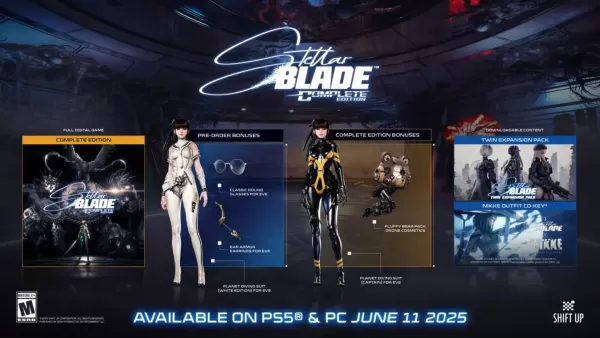 Stellar Blade launches on PC via Steam on June 11, accompanied by a host of PC-exclusive features, as revealed in a trailer that was briefly posted by Sony before being taken down.The trailer, published by Sony Interactive Entertainment on the PlayStAuthor : Logan Jun 06,2026
-
 ROYAL SLOTS CASINO: Wild Vegas Slot MachineDownload
 -
![[18+] Starlewd Valley:Re!](https://images.ydxad.com/uploads/37/173149215167347937c925c.jpg) [18+] Starlewd Valley:Re!Download
[18+] Starlewd Valley:Re!Download -
 Messy Academy (abdl diaper vn)Download
 -
 この素晴らしい世界に祝福を!ファンタスティックデイズDownload
 -
 BourreDownload
 -
 MagnoJuegos 5-EN-1Download
 -
 A Simple Life with My Unobtrusive SisterDownload
 -
 Collapse NPC RapeDownload
 -
 Hey Love Adam ModDownload
 -
 RogueMaster : Action RPGDownload











- Classic WoW vs. Turtle WoW: 6 Key Differences
- Ultimate Guide to Shinigami Progression in Hollow Era
- Roblox Simulator Codes: Unlock Exclusive Rewards!
- Mastering Two-Handed Weapons in Elden Ring: A Guide
- Wuthering Waves: Uncover the Secrets of Whisperwind Haven's Palette
- Top 25 Palworld Mods to Enhance Your Game